My site (v3.1)
This is version 3.1 of the site, after 3 years.
Also see version 6.0 here: https://pt13762104.github.io/newsite-v5.0/.
- New features:
- Move to Zensical
- ...
This is version 3.1 of the site, after 3 years.
Also see version 6.0 here: https://pt13762104.github.io/newsite-v5.0/.
I've grabbed the image slider code from https://clamtech.org to do my own comparisons. Here's a demo:
TLDR: It's probably 96.
https://chipsandcheese.com/p/cortex-a73s-not-so-infinite-reordering-capacity
Here we've seen a "practical" limitation handled by the PRRT and store buffer. But... is that enough?
After testing a lot of things that didn't really go anywhere (because as I've said, A73 discard nops), I've finally settled on modifying the A73 ROB Test described above.
Here's the configuration that reached the highest inflection point of 85: mov x11, 0 repeated 47 times, and an arbitary FP instruction (eg. eor v0.8b, v0.8b, v0.8b or fadd d0, d0, d0) repeated 38 times. (Yes, it's that weird.)
The "move to zero" or "rename" queue seems to have a size of 48. Any more integer instructions/branch/etc inserted after these two only worsens the inflection point. I also tried to insert integer instructions in between, still nothing.
So, for all practical purposes, A73 can reorder at most 86 instructions. The ROB capacity is unexplored, still. Maybe another day someone has a solution?
I've tried to escape the effects of the PRRT and the FP RF by interleaving blocks of renames and FP (so that the FP instructions can retire in the renaming phase).
Here's the result:
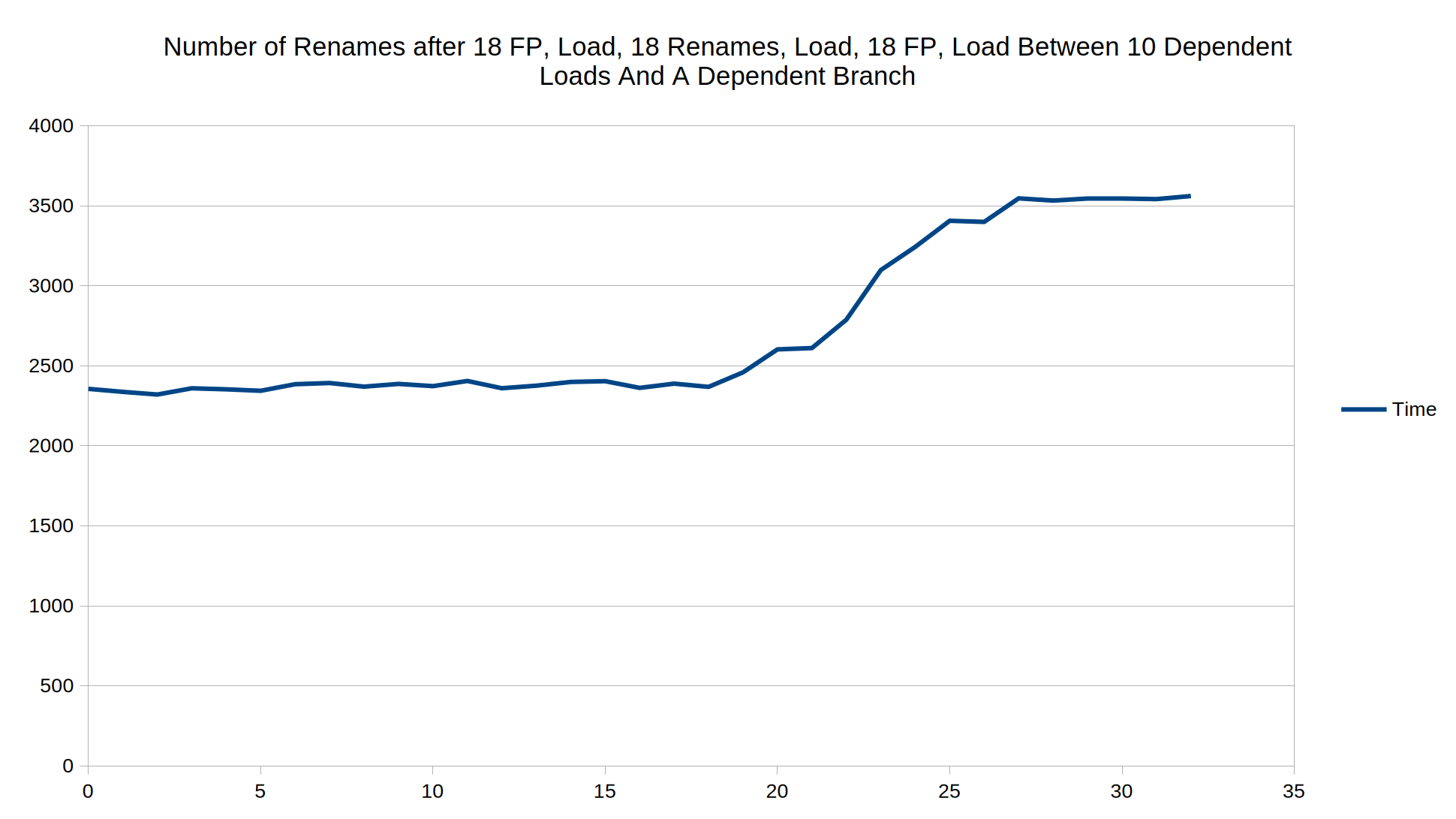
As you can see, the inflection point is at 18. This shows that the maximum reordering capacity is probably \(10 + 10 + 1 \text{ (fused branch)} + 3 + 18 \times 4 = 96\) instructions.
Comment: A73 has a more extreme version of Golden/Lion Cove's disproportionately small speculative register file(s) compared to the ROB. In case of the A73, the maximum reordering capacity will probably never be a bottleneck in any realistic application.
As per C&C:
I've been taking a look at sample 4K HDR videos, and this one caught my attention.
It's that I wanted to test out encoders' efficiency, and whether I can fit the video into file sizes limit of social media platforms (e.g. Discord.)
TLDR:
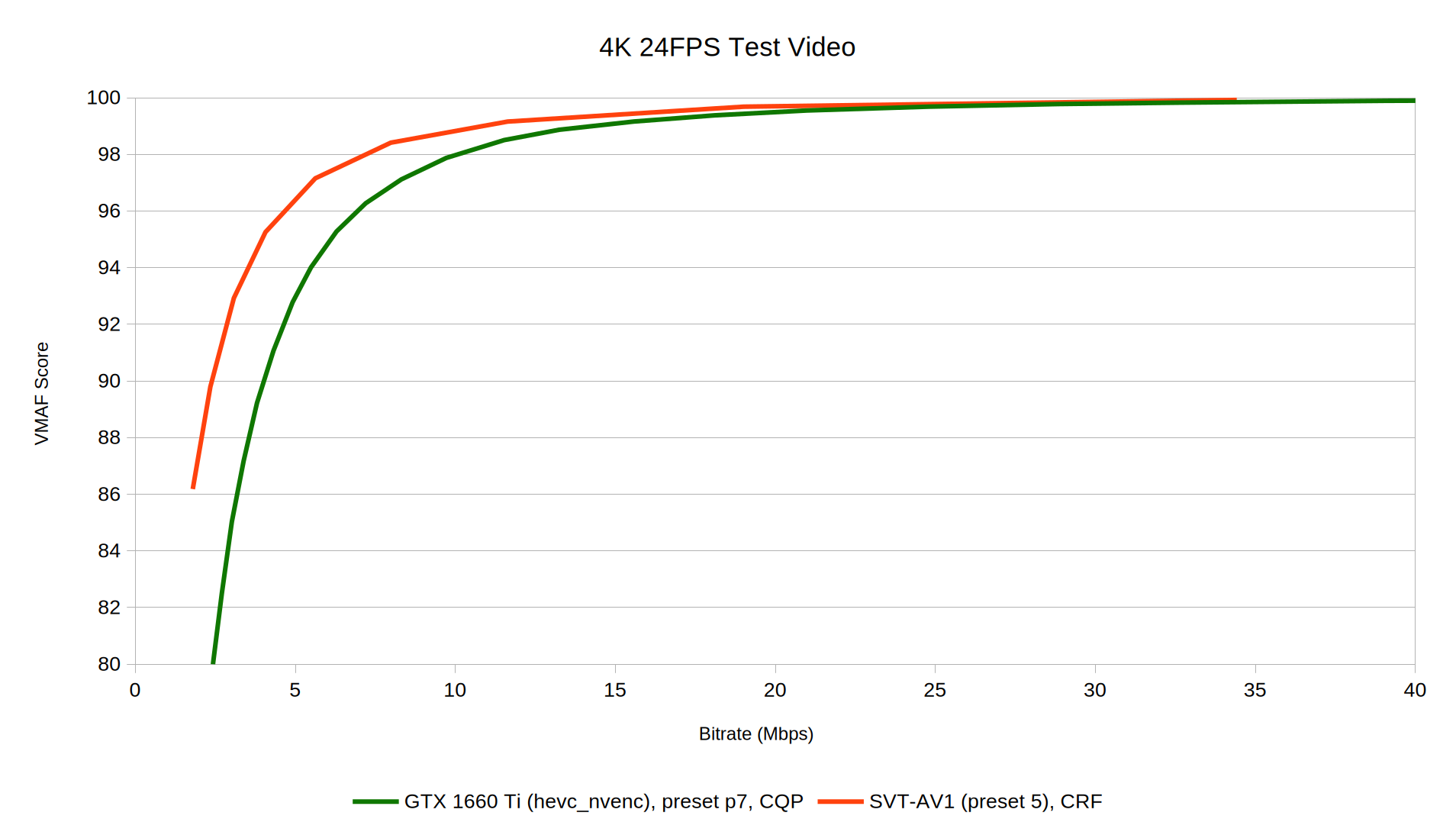
Here's an example showcasing SVT-AV1's advantage on small bitrates (about 2.4 Mbps):
NVENC, on the other hand:
Also, here's NVENC at maximum quantization:
After a long fight with the encoders, I've chosen the below configuration for the file size limits:
20 MiB (Discord): SVT-AV1, crf=43, preset=3, audio being AAC at 128 kb/s (42 slightly exceeds the limit.)
100 MiB (GitHub): SVT-AV1-HDR, crf=32, preset=3, tune=0 (VQ), audio being AAC at 256 kb/s (31 slightly exceeds the limit.)
20 MiB limit:
100 MiB limit:
Also this is what happens if you send the video through mobile Discord:
(Note: Discord retains the color space information, while the video's thumbnail will not reflect the correct color, the player has a 50% chance of being able to do it. If you take a closer look, you'll see it's an 480p H264 video.)
It might sound a bit illogical at first, "locked" and "overclocking" doesn't usually come together. But... have you heard of "partial overclocking"?
Does this reminds you of Tiger Lake H?
You may or may not have prepared for the chip I'm working with. It's not TGL-H, but something way worse...
It's the RK3326. The chip that blew up in popularity due to the R36 series of devices.
All experiments are done on a RG351M (which is another RK3326 device), with a "I don't care" personality.
Back in 2023, I was discovering "CPU overclocking" options on many distros, which usually pushed the clocks from 1.3 to 1.5 GHz.
At that time, I couldn't verify that claim, because I didn't really know how to do it.
One day, I decided to say "1.5 GHz is NOT enough", and decided to push the clocks to the max.
I was on Rocknix at that time, and with the mhz tool, I quickly added extra operating points and push the clocks higher and higher.
But that's when I realized... the chip is locked.
The chip is locked at 1.6 GHz (67x multiplier at 24 MHz base clock). Rockchip probably was not planning anyone to push the clocks that high.
An operating point, or an "OPP" is described by voltage and frequency points.
Here are the stable voltages for my RK3326:
| Frequency | Voltage |
|---|---|
| 1.3 GHz | 1.35V |
| 1.4 GHz | 1.35V (max rated) |
| 1.5 GHz | 1.40V (crashes while overheating) |
| 1.6 GHz | 1.50V (max, crashes while overheating) |
There's no point in doing more than 1.50V because the VRM doesn't support it; and the CPU is locked.
There's a need of a "safe operating point" e.g. 1.3 GHz, or using "turbo mode" to restrict the frequency being boost ones to avoid overheating.
But... Rocknix's mainline kernel wasn't up to my expectations. It had all of the good things I wanted, but except for one thing...
At first, I tried the classical "OPP" method of adding operating points. The short explanation is: the frequency is still oscilating randomly. Basically, the CPU lies to you about what frequency it actually ran.
The CPU actually has bins, being L0, L1, L2 and L3 (L0 being the lowest and L3 highest). The "rockchip-avs" option controls the voltage and frequencies for the CPU based on the bins and temperatures.
From https://cateee.net/lkddb/web-lkddb/POWER_AVS.html: "AVS is a power management technique which finely controls the operating voltage of a device in order to optimize (i.e. reduce) its power consumption. At a given operating point the voltage is adapted depending on static factors (chip manufacturing process) and dynamic factors (temperature depending performance)."
For example, here are the voltages based on the bins at 1.5 GHz:
        opp-1512000000 {
                opp-hz = <0x00 0x5a1f4a00>;
                opp-microvolt = <0x149970 0x149970 0x149970>;
                opp-microvolt-L0 = <0x149970 0x149970 0x149970>;
                opp-microvolt-L1 = <0x149970 0x149970 0x149970>;
                opp-microvolt-L2 = <0x13d620 0x13d620 0x149970>;
                opp-microvolt-L3 = <0x1312d0 0x1312d0 0x149970>;
                clock-latency-ns = <0x9c40>;
        };
        rockchip,temp-hysteresis = <0x1388>;
        rockchip,low-temp = <0x00>;
        rockchip,low-temp-min-volt = <0xf4240>;
        rockchip,low-temp-adjust-volt = <0x00 0x5e8 0xc350>;
        clocks = <0x02 0x01>;
        rockchip,avs-scale = <0x04>;
        rockchip,max-volt = <0x149970>;
        rockchip,evb-irdrop = <0x61a8>;
        nvmem-cells = <0x07 0x08>;
        nvmem-cell-names = "cpu_leakage", "performance";
        rockchip,bin-scaling-sel = <0x00 0x0d 0x01 0x0f 0x02 0x12 0x03 0x19>;
        rockchip,pvtm-voltage-sel = <0x00 0xc350 0x00 0xc351 0xd2f0 0x01 0xd2f1 0xea60 0x02 0xea61 0x1869f 0x03>;
        rockchip,pvtm-freq = <0x639c0>;
        rockchip,pvtm-volt = <0xf4240>;
        rockchip,pvtm-ch = <0x00 0x00>;
        rockchip,pvtm-sample-time = <0x3e8>;
        rockchip,pvtm-number = <0x0a>;
        rockchip,pvtm-error = <0x3e8>;
        rockchip,pvtm-ref-temp = <0x28>;
        rockchip,pvtm-temp-prop = <0xffffffc8 0xffffffc8>;
        rockchip,thermal-zone = "soc-thermal";
        rockchip,avs = <0x01>;
One day, I saw an "overclocking kernel" for the R36S, being https://github.com/teacupx/linux-r36s. After inspection, I didn't see any "special" patching or behavior other than setting the OPPs, so I quickly tried to delete these rockchip options and see if it now recognizes my set frequency points correctly.
It finally did. I was happy to see the RK3326 finally performing at its best, even if it meant burning itself (1.50V basically does that); or its "peak" is worse than a Skylake core sleeping.
This took me months to realize these rockchip options are interfering with my frequency points, thus causing it to not following what I set.
As I've said, why did I choose the stock kernel over the (definitely more usable) mainline kernel? The answer is explained below...
The mainline kernel doesn't include DMC support. That is, it doesn't support setting memory frequencies and do frequency scaling. The memory is stuck at the RK3326 default of 333MHz (DDR3L-666), which contributes to poor performance.
The memory is 1 GB of DDR3L-1600, which can be overclocked to DDR3L-2160/2112 based on my observations. (2160 is partially unstable)
Here's the memory latency and bandwidth table for the RK3326 based on the RAM frequency:
| Frequency | Latency at 32MB test size (approximate) | Bandwidth (4C Memory bandwidth test) |
|---|---|---|
| 333 MHz | 260ns | 2 GB/s |
| 786 MHz (stock) | 140ns | 5 GB/s |
| 924 MHz | 130ns | 6 GB/s |
| 1056 MHz | 120ns | 7.2 GB/s |
All tests are done with 1.15V IMC voltage (max) and validated for stability through Stockfish and memtester.
Behavior of the memory (controller) on extreme frequencies:
| Frequency | Voltage |
|---|---|
| 1080 MHz | Unstable |
| 1104 MHz | Very unstable, has a 20% chance of booting up |
| 1128 MHz | Incapable of getting to EmulationStation, kernel panic |
| 1152+ MHz | Does not boot |
The answer is "It's like FurMark. While it may not find all problems, it'll find the obvious, the not-so-obvious and burn your device to near-death".
Stockfish multi-threaded was the heaviest test I can apply to the RK3326. If sysbench was "100% synthetic", Stockfish is 100% synthetic mixed with a death note to the NEON units.
Temperatures were up to 20 degrees higher than that of sysbench, and can go near 100 degrees C before the chip crashes.
It also helps to find unstable overclocks that'll crash in a few hours, because that's reduced to only a few seconds of launching Stockfish and see if it crashes or not.
While a quad core A510 cluster on 4nm barely heats up, a quad core Cortex-A35 on 28nm can radiate heat so much it's like launching my Cortex-X2 at full load.
While the RK3326 might be a locked chip, I actually had fun inspecting its corners and pushing it to its absolute limit. It's almost as if the chip was actually unlocked anyways.
The only thing I found lacking about the chip is the inability to push the IMC voltage further, and if you care about performance, ITSELF.
Sadly, even in 2026, I don't have another unlocked chip to test out overclocking. It probably wouldn't be that much anyways.
I've also taken a look at the GPU frequency, and as shown in https://github.com/zenmode-adri/r36-tuner-next, you can only overclock the GPU to 600 MHz. This represents a negligible increase over the 560 MHz baseline.
The GPU can do a peak of 9.6 GFLOPS FP32 (8 shaders at 600 MHz).
    Platform: ARM Platform
      Device: Mali-G31
        Driver version  : 2.0 (Linux ARM64)
        Compute units   : 1
        Clock frequency : 600 MHz

        Global memory bandwidth (GBPS)
          float   : 3.67
          float2  : 4.07
          float4  : 3.82
          float8  : 1.55
          float16 : 0.84

        Single-precision compute (GFLOPS)
          float   : 9.55
          float2  : 9.53
          float4  : 9.53
          float8  : 9.50
          float16 : 8.90

        Half-precision compute (GFLOPS)
          half   : 9.56
          half2  : 18.98
          half4  : 18.92
          half8  : 18.80
          half16 : 18.59

        No double precision support! Skipped

        Integer compute (GIOPS)
          int   : 8.96
          int2  : 9.21
          int4  : 9.33
          int8  : 9.33
          int16 : 6.32

        Integer compute Fast 24bit (GIOPS)
          int   : 8.96
          int2  : 9.21
          int4  : 9.33
          int8  : 9.34
          int16 : 6.32

        Integer char (8bit) compute (GIOPS)
          char   : 8.47
          char2  : 16.74
          char4  : 32.24
          char8  : 33.14
          char16 : 31.09

        Integer short (16bit) compute (GIOPS)
          short   : 8.47
          short2  : 16.76
          short4  : 17.53
          short8  : 17.66
          short16 : 11.71

        Transfer bandwidth (GBPS)
          enqueueWriteBuffer              : 1.19
          enqueueReadBuffer               : 1.36
          enqueueWriteBuffer non-blocking : 1.20
          enqueueReadBuffer non-blocking  : 1.40
          enqueueMapBuffer(for read)      : 7.28
            memcpy from mapped ptr        : 1.59
          enqueueUnmap(after write)       : 7.37
            memcpy to mapped ptr          : 1.51

        Kernel launch latency : 109.04 us
For a long time, SPEC has been a well-known (in some circles) benchmark. I keep hearing it from time to time, but I don't know what it does or how to use it yet. Until one day.....
SPEC drops from the sky, including both 2006 and 2017 versions. If you know, you know.
Now that I've gotten SPEC, the adventure begins...
First installation, I immediately got an error related to Perl tests. With some patching and manifest editing, that seems to "fix" it. But then, I'll regret it later...
"The correct way to handle SPEC is to NOT test it..."
It was a tiring experience to do the config files, compiler flags, etc.
But then, after many failed tries due to not having enough time, errors, etc, I got my first few results:
But this is just the start...
After trying out GCC and abusing it, I take a look at Clang. It was not great, to be honest.
In both SPEC CPU 2006 and 2017, Clang performed consistently worse. (In most benchmarks, that is.)
There was hope in seeing Clang improves 525 on x86, but that hope was short-lived. It survived from the moment I tested 525 to the first full run.
On the topic of 462, the one benchmark that either tests:
ICC literally demonstrates perfect scaling and >9X the performance of GCC/Clang on 462. It regressed significantly over GCC in some other benchmarks, but the 20+X performance gain of ICC in 462 literally renders the result useless.
This is probably one of the reasons why 462 was never to be seen again.
Conclusion: For SPEC (06/17), prefer GCC over Clang. ICC could be another reasonable option if you prefer breaking the rules.
malloc() matter?The answer: Yes, somewhat.
I heard that mimalloc and jemalloc were commonly used in SPEC results, and there's a reason for why:
523.xalancbmk. (this is the most prominent example)
Using either of the malloc implementations literally gives you double the score. I'm not joking.
There's about a 10% boost in using these, which is significant (at least, it makes I feel better about my scores, while I'll still be slower than an iPad.)
In my SPEC adventure, I tested multiple flags collections.
Some observations:
O3 is much preferred over O2 (+ autovec). Ofast doesn't seem to have much implications; can fail perlbench's signed zero test on ARM (matters only if you do reportable runs.)
flto boosts your scores by a significant amount; -march=native is smaller.
-mcpu doesn't really matter, a 1-2% of difference at most (still noticeable, just not that much.)
-funroll-loops has unnoticeable effect.
Generally the optimal flags are -O3 (or Ofast) -flto -march=native -mcpu=[CPU name] (ARM only) -ljemalloc.
For an equal comparison, -march=native might be keep at the minimum subset; or omitted entirely. On SPEC26, this flag has an even stronger effect (706/772); 525 really benefits from vectorization.
The good:
It (the tests) works on X86! I think I should stop here now!
Just kidding, no. It will only get much worse later on...
The bad:
First, the failed Perl tests. I tried the same patching method on a different ARM device, couldn't get it to work. As with everything that I don't like, the choice is just to disable the tests and move on.
Now, for the compatibility flags.
For SPEC06/17 on x86, you only really need -Wno-error=template-body for GCC 15+, which is fine.
But the situation isn't as smooth-sailing on ARM.
The ugly:
Building SPEC (yes, SPEC itself) on ARM takes a lot of time (SPEC06 only, why would I spend so much time on an obsolete benchmark? I don't know.).
Even worse, most of the time is spent on configuring and testing, which means more time wasted on doing things repeatedly. Forgotting to enable GNU extensions was a mistake that costed me many rebuilds, and even then the Perl tests would still fail.
It's not the only part that fails, by the way. That part was commented out.
Running SPEC06 on ARM wasn't an exactly satisfying experience either. Five compliation errors means FIVE different compatibility flags, just for an obsolete benchmark.
Figuring out how to run SPEC on Clang was another painful experience. There's a flag, -fdelayed-template-parsing, that fixes 523's error. I can't find any documentation about this flag.
Except for a single benchmark that kept crashing, probably due to ISA differences.
As the name "adventure" suggests, I had spent a lot of my time running SPEC on any device that I have on hand. https://pt13762104.github.io/benchview/ is my collection of (best) SPEC results.
(Thanks to Titanic (Chips And Cheese) for the 5950X result.)
I've wasted a measurable amount of time dealing with 429 on the A35, but to no avail, it was still crashing.
As reflected in the results, 520 and 541, and (502, 505 to a lesser extent) were having significant memory-related bottlenecks. 520 is the worst offender of them all being mainly memory latency bottlenecked.
On my phone, SPEC results were quite inconsistent. I don't know why, but it seems like the phone is actually doing it at 2.55GHz at times (possibly throttling?) instead of 3.35GHz.
At least I got a 7.68 (the result reflected above is a best-of-2, which is 7.71) and two 7.62s with it, which isn't bad, but the poor 520 result agains shows how high-latency LPDDR can hurt performance.
There's a 17% SMT gain on Skylake, which can be seen here: https://www.youtube.com/watch?v=zx6ZFyRa-Hs.
Also, I've tried to run some MT benchmarks, but the results were significantly worse than ICC (~20% based on comparable SPEC results), with 505 on ICC literally doubling the rate.
Given that SPEC26 is out, and I'm eager to try it out, it's almost as if I've fully beaten the dead horse that is SPEC17.
But there're still a few interesting things left:
Figuring how to get a 10 on my 7840U. (This wasn't interesting, it was rather tiring and repetitive, and may even be counted as gambling.)
Running rate-N benchmarks (N=2..MAX) to see SMT performance gains and thread scaling.
Doing more runs with stats, which I only knew how to do it recently (thanks https://jia.je).
SPEC CPU is an interesting benchmark, to say the least. Workloads demonstrates diversity and exercises different parts of the system, including memory-heavy workloads.
Compared to Geekbench, SPEC (06/17) demonstrates less ISA gains and underrates small cores (like A76, which Skylake has a 30% PPC advantage, while on Geekbench 7 that gap reduces to only 15%.)
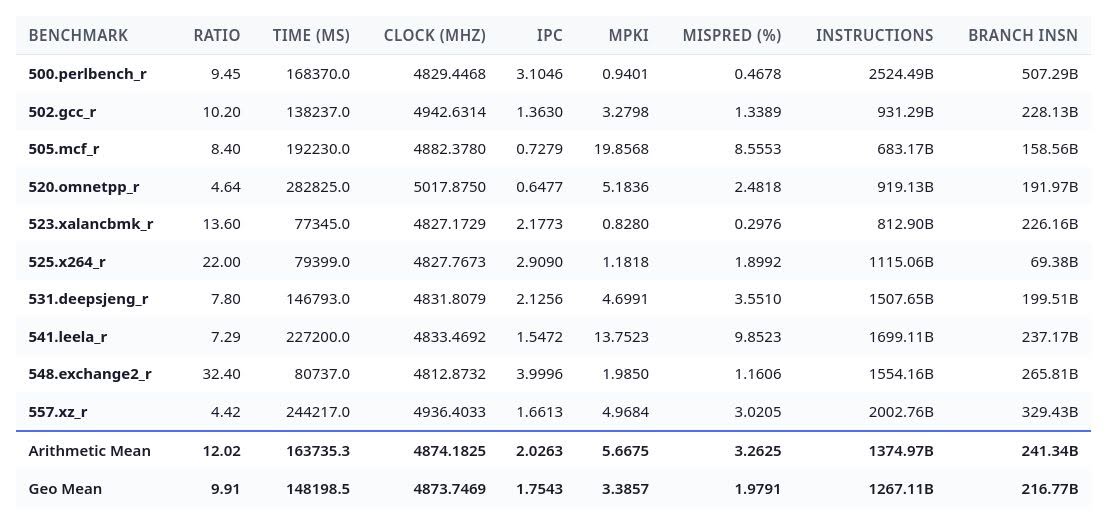
To end the article, here's a logged SPEC17 result, the first one with the perf metrics:
To be continued...
A continuation of the 3N E2B benchmarks, now with faster hardware and models.
LiteRT-LM model: https://huggingface.co/litert-community/gemma-4-E2B-it-litert-lm/blob/main/gemma-4-E2B-it.litertlm
llama.cpp Q4_0 model: https://huggingface.co/google/gemma-4-E2B-it-qat-q4_0-gguf/resolve/main/gemma-4-E2B_q4_0-it.gguf
We'll denote the hardware as follows:
| ID | Info |
|---|---|
| CPU 1 | Dimensity 9000+ (A710 = 1.8 GHz, X2 = 2.55 GHz) |
| CPU 1.1 | Dimensity 9000+ (max freq) |
| CPU 2 | i7-10750H (2.6 GHz) |
| CPU 2.1 | i7-10750H (max freq, ~3.4 GHz) |
| GPU 1 | Mali-G710 MP10 (max freq) |
| GPU 2 | GTX 1660 Ti (max freq) |
| GPU 2.1 | GTX 1660 Ti (1.455 GHz) |
TPS is taken as an average of 5 runs.
Configuration:
LiteRT-LM: enable-speculative-decoding = false
llama.cpp: ub = 1024, threads=n_cores/2
For CPU 1, llama.cpp is configured as follows: -DGGML_NATIVE=off -DGGML_CPU_ARM_ARCH=native+dotprod+i8mm+nosve
For GPU 2, llama.cpp is https://github.com/pt13762104/llama.cpp/commit/c5914bbd918022518bb5c0645bcdb24e3bc404f2 with GGML_CUDA_NO_TURING_MMA enabled.
Benchmarks:
| Benchmark | CPU 1 | CPU 1.1 | CPU 2 | CPU 2.1 |
|---|---|---|---|---|
| pp1024 | 151.98 | 184.57 | 153.96 | 211.37 |
| tg256 @ d1024 | 15.13 | 16.07 | 17.23 | 20.45 |
Comment: Power efficiency of the CPU is poor. TG is inherently memory bottlenecked. CPU 2 demonstrates much better scaling.
| Benchmark | GPU 1 | GPU 2 | GPU 2.1 |
|---|---|---|---|
| pp1024 | 874.90 | 4877.41 | 4411.52 |
| tg256 @ d1024 | 19.16 | 98.96 | 79.00 |
Comment: Clearly the GTX 1660 Ti is ALU bottlenecked in the decode phase. The Mali-G710 MP10 was really fast compared to the CPUs.
| Benchmark | CPU 1 | CPU 1.1 | CPU 2 | CPU 2.1 |
|---|---|---|---|---|
| pp1024 | 80.67 | 103.53 | 71.26 | 84.24 |
| tg256 | 15.10 | 17.87 | 17.82 | 20.48 |
| pp1024 @ d4096 | 42.99 | 53.76 | 54.26 | 64.25 |
| tg256 @ d4096 | 12.68 | 14.01 | 14.88 | 17.29 |
Comment: Slightly better scaling than LiteRT-LM for CPU 1, but objectively worse performance.
| Benchmark | GPU 2 | GPU 2.1 |
|---|---|---|
| pp1024 | 2165.55 | 1860.03 |
| tg256 | 118.57 | 102.95 |
| pp1024 @ d4096 | 1496.00 | 1311.85 |
| tg256 @ d4096 | 112.58 | 99.38 |
Comment: Better decode scaling, but falls short of LiteRT-LM in prompt processing.
Conclusion: LiteRT-LM is the first viable option for phone inference. If you want to burn your hand while enjoying (much) slower inference, llama.cpp (on the phone) is probably for you.
It should be noted that the LiteRT-LM model is optimized for phone inference*, and should not be considered a replacement to the llama.cpp Q4_0 model.
*Note that this is a 2-bit and not a 4-bit model. Accuracy might be evaluated on another time, e.g. on a RTX 3080 when I have time to do so.
It was at the time when I saw these cheap retro gaming consoles with only 4GB of storage and 512MB of RAM. I've thought: Could I make a complete retro gaming distribution in that same space?
The answer: Not really. I could squeeze things in 4GB of space, but not 512MB of RAM. Not even close.
But anyways, here's the download link: https://drive.google.com/file/d/1-LzuryJ2MBLoBvcXmFuBgm9OQ3V_TUy0/view?usp=sharing. Use it at your own risk. (You can also drop it directly to a Ventoy USB.)
There's no sound (I'm too lazy to install it). Wireless drivers and other things took up too much space, so it's also excluded.
This is a simple Debian installation with ES-DE and RetroArch (cores less than 20MB in size were kept).
When you start the OS, an ES-DE instance will start at VT8. Stopping ES-DE makes it restart. You can login as emustation (password is the same.)
It's too resource hogging, and Batocera exists, so it's probably useless. But it's at least fun to try at the end :)
I've taken a look at https://www.phoronix.com/review/16-armlinux-sep2018/, and decided to test the Dimensity 9000 on these benchmarks.
The result: https://openbenchmarking.org/result/2602284-YOSH-260227012. Most of the benchmarks the Dimensity wins by a landslide excluding pgbench (it got a lead but the Socionext Developerbox is brute forcing it), or Perl Interpreter (I blame proot for this).
The X2-core was completely destroying anything else in 2018 (obviously), and the total run-time is so fast nothing even comes close (thanks to the X2-core again.). On the desktop leaderboard, the 9000 Plus pales in comparison. I have not tested that out but it should rank at the bottom.
I've also tested a few benchmarks out of my 10750H and it got about 4960X-5960X performance: https://openbenchmarking.org/result/2602287-YOSH-YOSHI9552.
A summary: https://docs.google.com/spreadsheets/d/1MC92otAyJLy6xrpeCMe5lM960kpfgVo6Gvjeg3wx6aE/edit?usp=sharing.
Here are a few benchmarks of Qwen3 0.6B (Q4_0) on a Dimensity 9000+:
Specs: 64 bit LPDDR5X-7500 (60.0 GB/s), 1xX2 (3350MHz), 3xA710 (3200 MHz), 4xA510 (1800MHz)
All benchmarks are done using llama.cpp build: 6602 (72b24d96) with clang version 20.1.8 (Fedora 20.1.8-4.fc42) for aarch64-redhat-linux-gnu with ubatch = 64. Tests on A510 are done with mmap enabled.
Compilation options: -DCMAKE_C_COMPILER=clang -DCMAKE_CXX_COMPILER=clang++ -DGGML_OPENMP=off
| model | size | params | backend | threads | n_ubatch | test | t/s |
|---|---|---|---|---|---|---|---|
| qwen3 0.6B Q4_0 | 358.78 MiB | 596.05 M | CPU | 1 | 64 | pp512 | 14.83 ± 0.00 |
| qwen3 0.6B Q4_0 | 358.78 MiB | 596.05 M | CPU | 1 | 64 | tg128 | 4.34 ± 0.00 |
| model | size | params | backend | threads | n_ubatch | mmap | test | t/s |
|---|---|---|---|---|---|---|---|---|
| qwen3 0.6B Q4_0 | 358.78 MiB | 596.05 M | CPU | 1 | 64 | 0 | pp512 | 96.77 ± 0.00 |
| qwen3 0.6B Q4_0 | 358.78 MiB | 596.05 M | CPU | 1 | 64 | 0 | tg128 | 27.20 ± 0.00 |
| model | size | params | backend | threads | n_ubatch | mmap | test | t/s |
|---|---|---|---|---|---|---|---|---|
| qwen3 0.6B Q4_0 | 358.78 MiB | 596.05 M | CPU | 1 | 64 | 0 | pp512 | 143.94 ± 0.00 |
| qwen3 0.6B Q4_0 | 358.78 MiB | 596.05 M | CPU | 1 | 64 | 0 | tg128 | 39.32 ± 0.00 |
| model | size | params | backend | threads | n_ubatch | test | t/s |
|---|---|---|---|---|---|---|---|
| qwen3 0.6B Q4_0 | 358.78 MiB | 596.05 M | CPU | 2 | 64 | pp512 | 25.97 ± 0.00 |
| qwen3 0.6B Q4_0 | 358.78 MiB | 596.05 M | CPU | 2 | 64 | tg128 | 6.92 ± 0.00 |
| model | size | params | backend | threads | n_ubatch | mmap | test | t/s |
|---|---|---|---|---|---|---|---|---|
| qwen3 0.6B Q4_0 | 358.78 MiB | 596.05 M | CPU | 2 | 64 | 0 | pp512 | 184.00 ± 0.00 |
| qwen3 0.6B Q4_0 | 358.78 MiB | 596.05 M | CPU | 2 | 64 | 0 | tg128 | 48.63 ± 0.00 |
| model | size | params | backend | threads | n_ubatch | mmap | test | t/s |
|---|---|---|---|---|---|---|---|---|
| qwen3 0.6B Q4_0 | 358.78 MiB | 596.05 M | CPU | 2 | 64 | 0 | pp512 | 196.54 ± 0.00 |
| qwen3 0.6B Q4_0 | 358.78 MiB | 596.05 M | CPU | 2 | 64 | 0 | tg128 | 52.45 ± 0.00 |
| model | size | params | backend | threads | n_ubatch | test | t/s |
|---|---|---|---|---|---|---|---|
| qwen3 0.6B Q4_0 | 358.78 MiB | 596.05 M | CPU | 3 | 64 | pp512 | 39.05 ± 0.00 |
| qwen3 0.6B Q4_0 | 358.78 MiB | 596.05 M | CPU | 3 | 64 | tg128 | 10.40 ± 0.00 |
| model | size | params | backend | threads | n_ubatch | mmap | test | t/s |
|---|---|---|---|---|---|---|---|---|
| qwen3 0.6B Q4_0 | 358.78 MiB | 596.05 M | CPU | 3 | 64 | 0 | pp512 | 267.38 ± 0.00 |
| qwen3 0.6B Q4_0 | 358.78 MiB | 596.05 M | CPU | 3 | 64 | 0 | tg128 | 64.33 ± 0.00 |
| model | size | params | backend | threads | n_ubatch | mmap | test | t/s |
|---|---|---|---|---|---|---|---|---|
| qwen3 0.6B Q4_0 | 358.78 MiB | 596.05 M | CPU | 3 | 64 | 0 | pp512 | 284.89 ± 0.00 |
| qwen3 0.6B Q4_0 | 358.78 MiB | 596.05 M | CPU | 3 | 64 | 0 | tg128 | 65.91 ± 0.00 |
| model | size | params | backend | threads | n_ubatch | test | t/s |
|---|---|---|---|---|---|---|---|
| qwen3 0.6B Q4_0 | 358.78 MiB | 596.05 M | CPU | 4 | 64 | pp512 | 43.76 ± 0.00 |
| qwen3 0.6B Q4_0 | 358.78 MiB | 596.05 M | CPU | 4 | 64 | tg128 | 10.51 ± 0.00 |
| model | size | params | backend | threads | n_ubatch | mmap | test | t/s |
|---|---|---|---|---|---|---|---|---|
| qwen3 0.6B Q4_0 | 358.78 MiB | 596.05 M | CPU | 4 | 64 | 0 | pp512 | 359.16 ± 0.00 |
| qwen3 0.6B Q4_0 | 358.78 MiB | 596.05 M | CPU | 4 | 64 | 0 | tg128 | 74.01 ± 0.00 |
| model | size | params | backend | threads | n_ubatch | mmap | test | t/s |
|---|---|---|---|---|---|---|---|---|
| qwen3 0.6B Q4_0 | 358.78 MiB | 596.05 M | CPU | 8 | 64 | 0 | pp512 | 86.80 ± 0.00 |
| qwen3 0.6B Q4_0 | 358.78 MiB | 596.05 M | CPU | 8 | 64 | 0 | tg128 | 22.08 ± 0.00 |